Your group's cozy corner.
Notes, tasks, chat, calendar and contacts in one calm app, with an AI assistant that always asks before it acts.
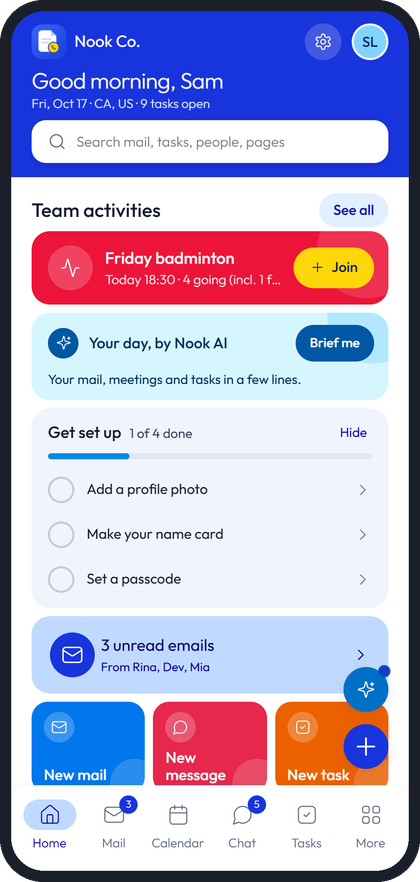
Everything your group uses,
in one calm place
Stop jumping between chat, to-do, mail and calendar apps. Nook keeps the day-to-day together, so nothing slips.
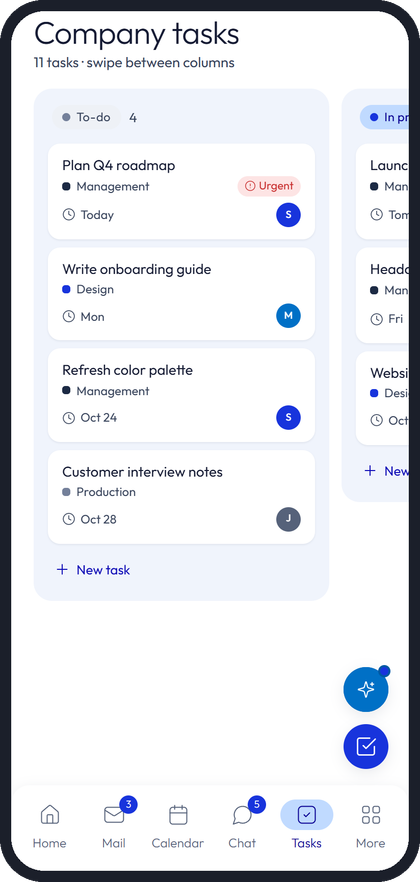
See who's on what, at a glance
A shared board everyone can follow. Swipe between To-do, In progress, Review and Done.
- Due dates, owners and flags for Urgent, Important and Waiting
- Tasks never land on someone who is away
- Finished work stays on record, so you can look back
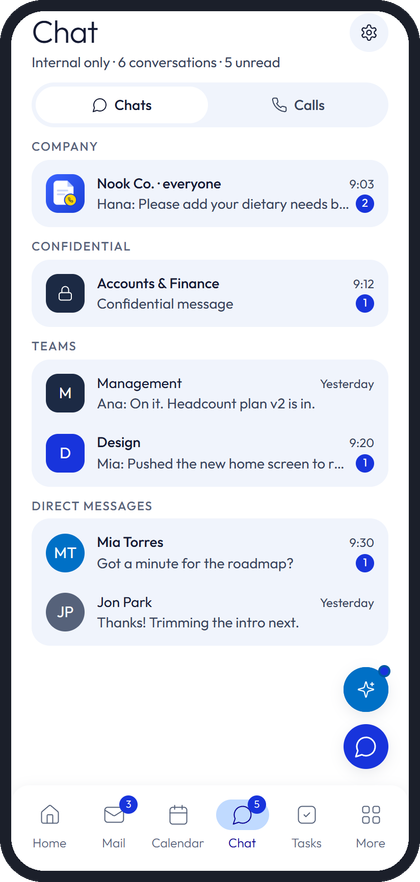
Talk it through, then call it
Everyone, team rooms and direct messages, all in one list.
- Company-wide, team and one-to-one chats
- Confidential rooms stay hidden until tapped
- Unread counts so you know where to look first
- Voice and video calls, a tap away
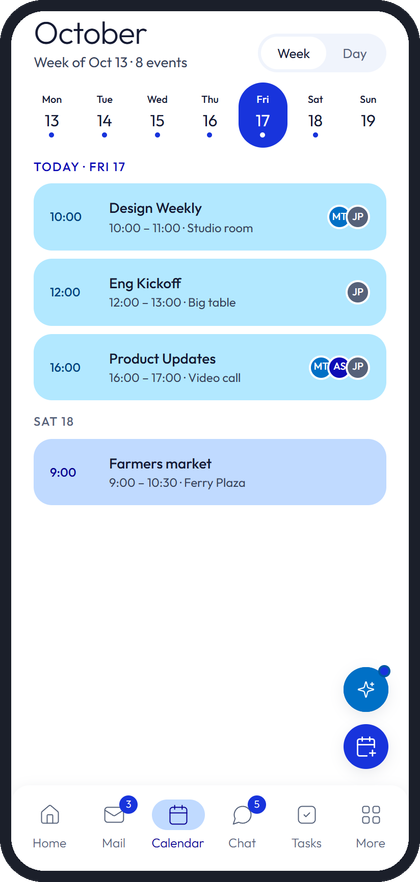
Plan the week together
From Design Weekly to Friday badminton. Meetings and get-togethers live in one shared calendar.
- Week and day views with who's attending
- Team activities on Home, with one-tap Join
- Nook AI can find a time when everyone is free
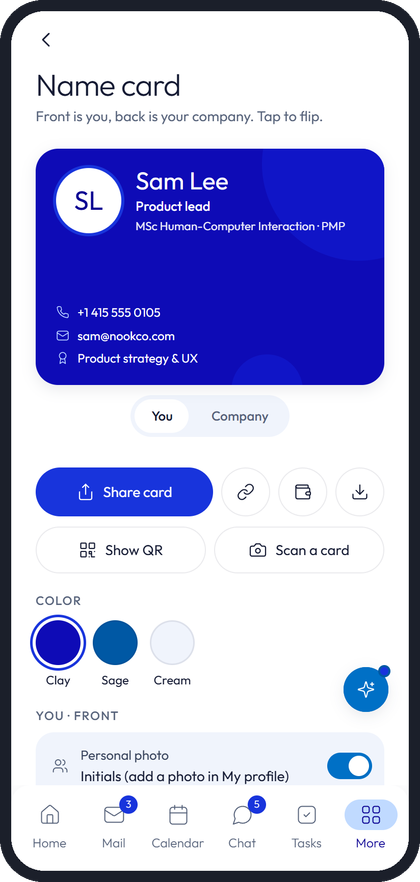
Your card, always in your pocket
A digital name card with you on the front and your company on the back. Share it by link or QR code.
- The other person doesn't need the app
- Scan someone else's card straight into contacts
- Pick a colour that suits you
Your inbox beside your tasks. Turn an email into a task in one tap.
Notes and pages
Private notes for you. Shared pages for the group.
Admin controls
Invite with a code, set roles and choose what Nook AI may read.
Passcode and themes
Lock the app with a passcode and make it yours with themes.
An assistant that always asks first
Tap Brief me for your mail, meetings and tasks in a few lines. Ask it to draft, plan or find a time. It proposes, and you decide.
You ask
In plain words, like you'd ask a teammate.
Nook proposes
Every action comes back as a card. Nothing has happened yet.
Rina · Due Thu 22-10
You confirm
Only your tap sends, saves or books anything.
Rina will see it on the board.
Small groups that get things done
Big enough to need a shared space. Small enough that a heavy work tool feels like too much.
Small teams
Studios, shops and start-ups that want tasks, chat and the week's plan in one place.
Clubs
Sports, hobby and volunteer groups. Plan sessions, see who's coming and keep the chatter in one room.
Families
Chores, school dates and the shopping list, shared with the people at home.
Start free. Grow with Plus.
The group admin picks the plan, and everyone in the group gets it.
Free
Free for good
- 1 group, up to 5 people
- Tasks, chat, calendar, notes and name card
- Finished tasks kept for 30 days
- 10 Nook AI requests a day
- Basic reminders
Plus
7-DAY FREE TRIALper group, billed monthly
- Unlimited groups, up to 20 people each
- Full task history
- 100 Nook AI requests a day
- Photos, files and custom reminders
- Cancel any time. Nothing is deleted.
Planned prices in Singapore dollars. Plans and limits may change before launch. Plus will be bought inside the app.
Prices in Singapore dollars. Plus is bought inside the app and billed by Google Play or the App Store.
Questions, answered
Is Nook really free?
Yes. The Free plan lets one group of up to 5 people use the essentials, with no time limit. Plus adds more people, more groups, full history and more Nook AI requests.
Who pays for Plus?
Only the group admin. One subscription upgrades the whole group. If it lapses, the group goes back to Free limits and nothing is deleted.
How do I pay for Plus?
Inside the Nook app, through your Google Play or App Store account. This website doesn't take payments. To cancel, use the subscriptions page of your store account.
Who can see my data?
Only the people in your group. Private notes are only yours, and confidential rooms are limited to their members. See our privacy policy.
Does Nook AI send things for me?
No. It proposes a card and you tap Confirm. It never sends, saves or books anything on its own.
Is there an iPhone version?
Yes, it's coming after the Android release.
Which phones does Nook work on?
Android phones (from Google Play) and iPhones (from the App Store).
Does Nook do email and calls?
They're on the way. Chat, tasks, calendar, notes and Nook AI come first, then mail and voice and video calls in a later update.
How do I delete my account?
You can do it in the app, or follow the steps on delete your account.
Note it. Call it. Done.
Nook is coming soon to Android, with iPhone to follow. Be one of the first groups to try it.
Nook is on Android now, with iPhone coming soon. Start your group for free.
Get Nook on Android and iPhone. Start your group for free.